
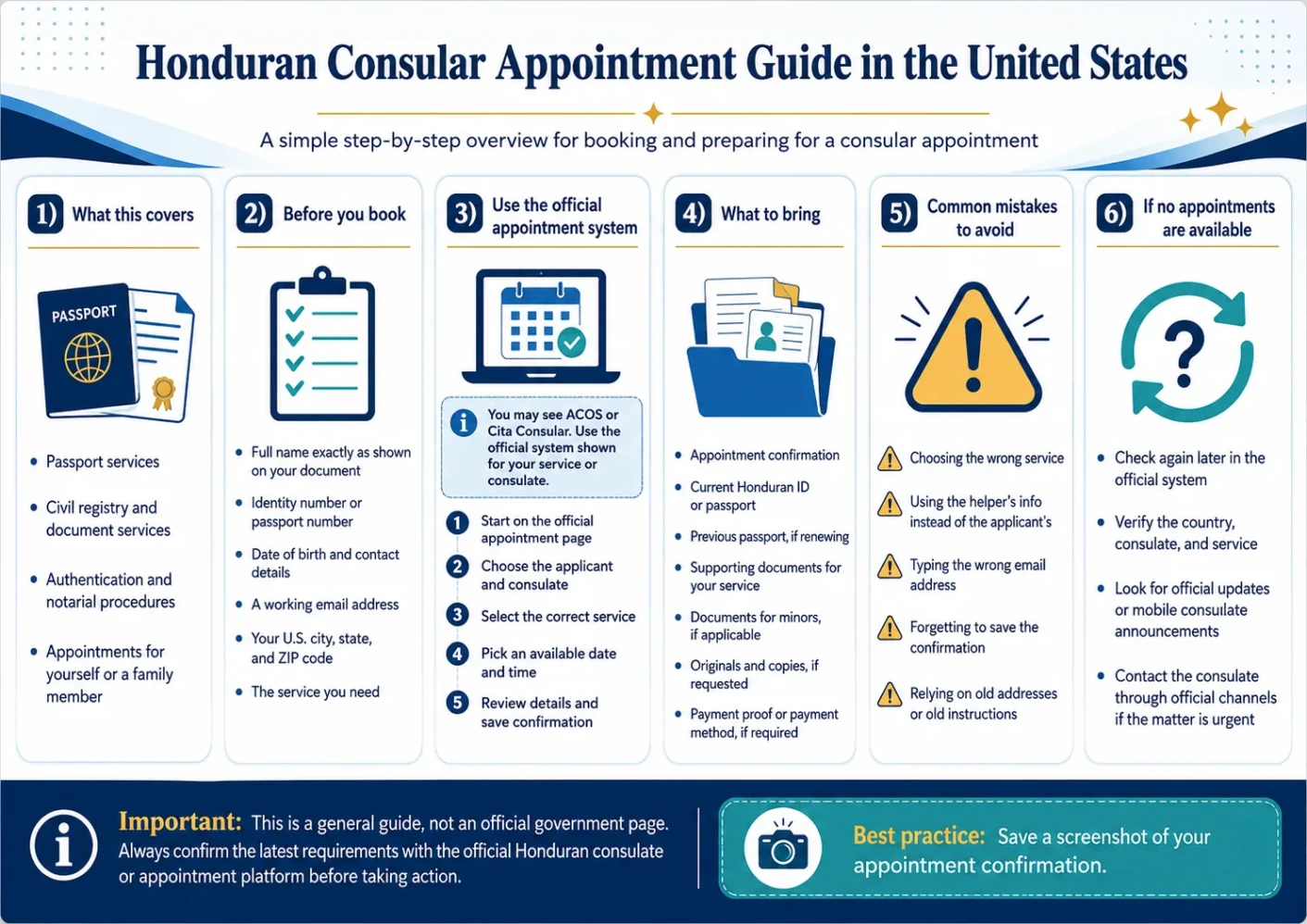
If you are trying to make a Honduran consular appointment in the United States, the first thing to do is slow the process down into small steps: choose the correct official system, select the consular office that makes sense for you, pick the service you need, and save your confirmation before you prepare your documents. The appointment page may not always look the same for every consulate, so the safest habit is to check the official link and read the instructions on the screen before you make travel plans.
Quick Answer: To book a Honduran consular appointment in the U.S., start with the official appointment platform used by the Honduran government. ACOS states that it is the authorized and free site for scheduling appointments at Honduran consular offices abroad [1]. Some official Honduras government pages may still point users to the Cita Consular system, so follow the official instruction shown for your service or consulate [2].
Important: This page is for general information only. It is not an official government page and it is not legal advice. Always confirm the latest requirements with the official consulate, appointment system, or government agency before taking action.
Who This Guide Is For
This guide is for Hondurans in the United States who need help understanding how the consular appointment process usually works.
It may help you if you are trying to make an appointment for a Honduran passport, a document service, a consular record, a notarial-type service, or another procedure handled by a Honduran consular office.
It is also useful if you are booking for a family member, helping an older relative, checking which consulate to choose, or trying to understand why one official page mentions ACOS while another page still mentions Cita Consular.
Before You Start, Keep This Simple
Before opening the appointment system, gather the basic information you will probably need. Do not wait until the form is open to start looking for names, ID numbers, email access, or service details.
Before You Start: Prepare these items first:
- Your Honduran identity number, passport number, or the information requested by the system.
- Your full name exactly as it appears on your Honduran documents.
- Your date of birth and contact information.
- A working email address that you can open immediately.
- Your current U.S. city, state, and ZIP code.
- The service you need, such as passport, document authentication, civil registry, or another consular procedure.
- Enough time to read the confirmation carefully before closing the page.
ACOS or Cita Consular: Which One Should You Use?
This is one of the most common points of confusion. You may see references to ACOS, and you may also see references to Cita Consular. That does not always mean you are doing something wrong.
Government systems can change in stages. One consular office may use a newer platform while another official instruction still points to the older system. The practical rule is simple: use the official link provided for the consulate or service you are trying to complete, and do not rely on copied links from unofficial pages.
| Your Situation | Where To Start | What To Check |
|---|---|---|
| You are making a new appointment | Start with the official appointment system currently shown for your consulate. | Make sure the page is a government or official consular system before entering personal information. |
| You see ACOS | Follow the ACOS instructions if that is the system shown for your appointment. | Create or access your account only through the official ACOS page. |
| You see Cita Consular | Use Cita Consular if the official government page for your service points you there. | Check whether the page asks for nationality, identity number, passport number, location, and service type. |
| You are not sure which consulate to choose | Look for the consular office closest to you or the one listed for your area. | Confirm address, hours, and service availability before traveling. |
Step-By-Step: How To Make a Honduran Consular Appointment
The exact screen may change, but the appointment process usually follows the same basic order. Think of it as a form that needs to know who you are, where you live, which consulate you want, and what service you need.
1. Start From the Official Appointment Page
Go directly to the official appointment system instead of searching through many unofficial pages. If you type the address manually, check the spelling carefully.
For some services, official Honduras government pages still list the Cita Consular appointment address as part of the trámite process. For example, the Honduras government portal page for consular authentication says the first step is to schedule a consular appointment and lists the Cita Consular application link [3].
Official Link: Use the official appointment link shown by the Honduran government or the specific consulate. If one official page sends you to ACOS and another service page sends you to Cita Consular, follow the instruction for the exact service and office you are using.
2. Choose Honduran or Foreign Applicant
The system may ask whether the applicant is Honduran or foreign. Choose the option that matches the person who will receive the service.
If you are booking for your child, parent, spouse, or another relative, be careful here. The appointment should normally be made with the information of the person who needs the consular service, not the helper’s information.
3. Enter the Requested Identity Information
The form may ask for a Honduran identity number, passport number, or another identifier. Type the information slowly and check it before moving forward.
Small errors can create problems later. A missing digit, a reversed number, or a name that does not match the document can make it harder for the consulate to verify the appointment.
4. Select the United States and Your Consular Office
After the identity section, the system usually asks for the applicant’s location. Choose the United States if you live in the U.S., then select the consular office where you want to be seen.
The U.S. Department of State lists Honduran consular contact information for several U.S. locations, including Washington, Atlanta, Boston, Charlotte, Chicago, Dallas, Houston, Los Angeles, McAllen, Miami, New Orleans, New York, San Francisco, and Seattle [4]. This kind of list is useful for orientation, but you should still confirm the current address, phone, email, hours, and available services with the official consulate before traveling.
5. Choose the Service You Need
Select the service that matches your reason for the appointment. Do not choose a different service just because it has an earlier date.
For example, a passport appointment is not the same as a document authentication appointment. A civil registry matter is not the same as a notarial-type procedure. If the wrong service is selected, the consulate may not be able to help you that day.
6. Pick an Available Date and Time
If appointments are available, choose a date and time you can realistically attend. Look at travel time, work schedule, parking, childcare, and document preparation before you confirm.
If no dates appear, do not assume the service is unavailable forever. Appointment availability may open at different times. Try again later through the official system and check whether the consulate has posted any current instruction.
7. Review Every Detail Before Confirming
Before you click the final confirmation button, read the appointment information from top to bottom.
- Is the applicant’s name correct?
- Is the email address correct?
- Did you choose the correct consulate?
- Did you choose the correct service?
- Is the date possible for you?
- Do you understand what documents may be required?
This step takes only a minute, but it can save you from a missed appointment or a trip to the wrong office.
8. Save the Confirmation
After confirming, save the appointment proof. If the system sends an email, keep it. If the page shows a confirmation screen, take a screenshot and print it if possible.
Also check your spam or junk folder. Some appointment emails may not appear in the main inbox right away.
What You May Need Before the Appointment
Your exact documents depend on the service, your age, and your situation. A passport renewal is different from a first passport, a minor’s passport, a power of attorney, a birth registration, or a document authentication.
Documents Checklist: Before the appointment, check the official requirement for your service and prepare the items that apply to your case.
- Appointment confirmation, printed or saved on your phone.
- Honduran identity document, passport, birth certificate, or other document requested by the service.
- Previous passport, if you are renewing and the consulate asks for it.
- Documents for a minor, if the appointment is for a child.
- Parent or guardian documents, if required for the child’s service.
- Payment proof or payment method, only if the official instruction asks for it.
- Original documents and copies, if the consulate requests both.
- Any additional form or receipt shown in the official appointment instructions.
Do not guess on document rules. Requirements can change, and some services have extra steps. The safest place to confirm the current list is the official appointment system or the consulate handling your appointment.
How To Choose the Right Consulate
Start with distance, but do not stop there. The nearest office may not always be the right one if your service is handled differently or if another office is the one shown in the official system.
Use these checks before you select a consulate:
- Check location: Choose the office you can realistically reach on the appointment day.
- Check service availability: Make sure the service you need appears for that office.
- Check appointment availability: If no date is open, look for official instructions before choosing a faraway office.
- Check current contact details: Addresses, phone numbers, emails, and hours can change.
- Check travel details: Plan parking, public transportation, arrival time, and security rules.
Important: Do not buy plane tickets, take unpaid time off, or make a long trip only because you saw an old address online. Confirm the appointment, office address, and service instructions with the official source first.
If You Are Booking for a Child or Family Member
Family appointments need extra care because the information must match the person receiving the service.
If the appointment is for a child, read the official instructions for minors before booking or traveling. A child’s passport, registration, or document service may require parent or guardian information, proof of relationship, consent rules, or original documents.
If you are helping an older relative, make sure the email and phone number used for the appointment can be checked later. If the confirmation goes to an email nobody can open, it may be hard to recover appointment details.
If No Appointments Are Available
It is frustrating to open the system and see no available dates. Still, that does not mean you should rush into the wrong service or enter information on a page you do not trust.
Try this instead:
- Check the official system again at another time.
- Make sure you selected the correct country, consulate, and service.
- Check whether the consulate has current instructions about appointment releases.
- Look for official announcements about mobile consulates, if those are available for your area.
- Avoid entering personal information on unofficial forms that promise faster appointments.
If the matter is urgent, contact the consulate through an official contact method and explain the situation clearly. Keep the message short and include your name, the service you need, and the city where you are located.
Common Mistakes To Avoid
Common Mistakes: Most appointment problems are simple mistakes that can be avoided with a careful check.
- Choosing the wrong service because another service shows an earlier date.
- Using the helper’s information instead of the applicant’s information.
- Typing an email address incorrectly.
- Forgetting to save or print the confirmation.
- Arriving without the original documents requested for the service.
- Assuming an old address, phone number, or fee is still current.
- Waiting until the night before to read the document list.
What To Check Before You Go
The day before your appointment, do a calm final review. You do not need to overcomplicate it. Just make sure the basics are ready.
| Check | Why It Matters |
|---|---|
| Appointment confirmation | You may need to show proof of your scheduled appointment. |
| Consulate address | Offices can move or change public instructions, so confirm before traveling. |
| Service selected | The consulate may prepare based on the service you chose in the system. |
| Original documents | Some services require originals, not only copies or phone photos. |
| Payment instruction | Payment method and amount can vary by service, office, and current rule. |
| Arrival time | Plan extra time for traffic, parking, building entry, and check-in. |
Consular Appointments and Immigration Questions
A Honduran consular appointment can help with Honduran documents and consular services. It is not the same as a U.S. immigration appointment.
If your question is about TPS, work authorization, immigration status, removal defense, asylum, or another U.S. immigration benefit, check the official U.S. government source and speak with a qualified immigration attorney if you need advice for your personal case. USCIS maintains the official country page for Temporary Protected Status information for Honduras [5].
Legal Note: Consular document information is not the same as immigration legal advice. If your decision could affect your immigration status, deadlines, work permit, court case, or family situation, consult a qualified immigration attorney or a trusted legal aid organization.
Resumen En Español
Si usted necesita una cita consular de Honduras en Estados Unidos, empiece por la página oficial que corresponda a su consulado o trámite. Puede encontrar referencias a ACOS y también a Cita Consular, porque algunos servicios o sedes pueden tener instrucciones diferentes.
Mantenga esto simple: prepare su número de identidad o pasaporte, use un correo electrónico que pueda revisar, seleccione el consulado correcto, elija el trámite correcto y guarde la confirmación. Antes de ir, confirme dirección, horario, documentos, forma de pago y requisitos actuales con la fuente oficial.
Si su pregunta es sobre TPS, permiso de trabajo o estatus migratorio en Estados Unidos, eso no se resuelve solo con una cita consular hondureña. Revise USCIS y consulte con un abogado de inmigración calificado si necesita orientación legal para su caso.
FAQ
Is a Honduran consular appointment required for passport services?
Usually, passport services at a Honduran consulate require an appointment, but the exact process can depend on the consulate and the current system. Confirm on the official appointment page before you go.
Should I use ACOS or Cita Consular?
Use the official system shown for your consulate or service. ACOS appears as an official appointment platform, while some government trámite pages may still direct users to Cita Consular. Follow the official instruction for the service you need.
Can I choose any Honduran consulate in the United States?
You may see several consular offices in the system, but you should choose the office that can handle your service and that you can realistically attend. Confirm location and service availability before making travel plans.
What should I do if there are no appointment dates?
Check again later through the official system, make sure you selected the correct service and location, and look for current instructions from the consulate. Do not choose the wrong service just to find a faster date.
Can I book an appointment for my child?
Yes, you may be able to help a child with an appointment, but the appointment information should normally match the child or the person receiving the service. Check the official requirements for minors before attending.
Do I need to print the confirmation?
If possible, print it and also keep a copy on your phone. Some offices may accept a digital confirmation, but having a printed copy is safer in case your phone battery, signal, or email access fails.
Are consular appointments free?
The appointment scheduling process should be checked through the official platform. Service fees, payment methods, and document costs can vary by trámite and current rule, so confirm the latest information before your appointment.
Can the Honduran consulate answer TPS or U.S. immigration status questions?
A consulate can help with Honduran documents and consular services, but U.S. immigration benefits are handled by U.S. agencies. For TPS or immigration status questions, check USCIS and speak with a qualified immigration attorney if needed.
Official Sources
- [1] ACOS – Aplicación de Servicios Consulares — This is a Honduras government appointment platform for consular services abroad, so it is an official place to verify whether ACOS is the correct appointment system for the office or service you need.
- [2] Cita Consular Honduras — This is the official Cita Consular system connected with Honduras consular services, useful when an official instruction still directs applicants to the Cita Consular platform.
- [3] Portal de Trámites Honduras – Auténtica Sección Consular — This Honduras government trámite page shows an example of a consular service where scheduling a consular appointment is listed as part of the official process.
- [4] U.S. Department of State – Honduras Consular Contact Information — This U.S. government page lists Honduran foreign consular office contact information in the United States and is useful for checking office locations before making travel plans.
- [5] USCIS – Temporary Protected Status Designated Country: Honduras — This is the official USCIS page for TPS information related to Honduras, so it is the proper U.S. government source to check for TPS updates rather than relying on consular appointment information.